No User Authentication
The No User Authentication options are display when the Web Terminal Authentication Method is set to No User.
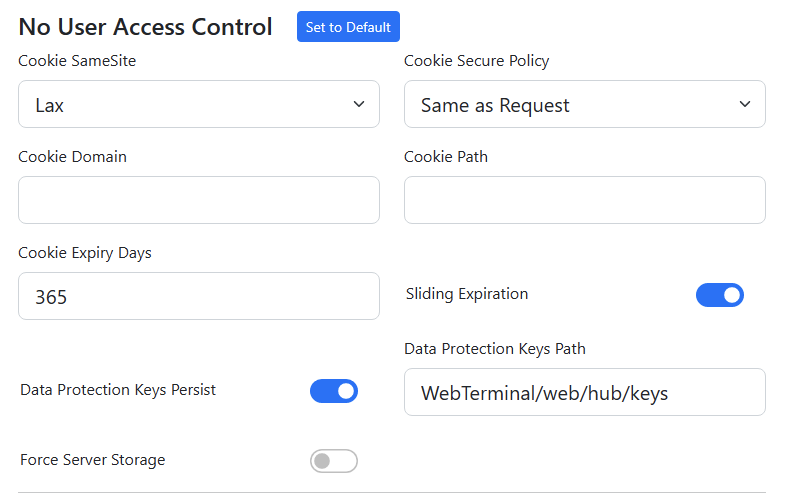
Cookie SameSite
This sets the cookie SameSite policy as per https://developer.mozilla.org/en-US/docs/Web/HTTP/Headers/Set-Cookie/SameSite.
Cookie Secure Policy
This sets the cookie secure policy as per https://developer.mozilla.org/en-US/docs/Web/HTTP/Headers/Set-Cookie/SameSite#secure.
Cookie Domain
If the Web Terminal is being published via a load balancer or some other proxy, sometimes that user-facing domain must be provided to associate the cookies with the correct domain.
Cookie Path
If the Web Terminal is being published via a load balancer or some other proxy, and the URL is being changed from the default /FJTerm, the administrator must provide the rewritten URL path here.
Cookie Expiry Days
The number of days before the cookie is expired and must be renewed. As this is for "no user authentication", which is effectively anonymous, this is not a security issue.
Sliding Expiration
This renews the cookie expiry days every time the users access /FJTerm. As this is for "no user authentication", which is effectively anonymous, this is not a security issue.
Data Protection Keys
This allows the Web Terminal to save the randomly generated encryption keys for authentication cookies to storage on the Jubilant server machine. This means that long lasting cookies (default 365 days) can be successfully decrypted even after server restarts.
It is worth noting that encryption keys are rotated transparently on a regular basis.
Data Protection Keys Path
The path on the Jubilant server storage where Data Protection Keys (above) are stored.
Force Server Storage
If this setting is enabled, user settings are stored on the server using the randomly generated ID. This is of limited use as the ID can change at any time. This is generally used for testing purposes.