keymappings.json
This file provides the default key mappings, which determines what is sent to the host when a defined key is pressed in a terminal session.
The Action setting needs to match an actual key action in keys.json. If the action type in keys.json is "ActionType": "AID", the Action setting in this file needs to end with " (HOST)" so where F1: "OriginalKey": "F1", is mapped to the PF1 AID key this will be: "Action": "PF1 (HOST)",
Where the action type is: "ActionType": "Client", (in the keys.json file) there is no need to change the value or append " (HOST)" to the end. As in this example:
  {
    "Value": "Tab",
    "Label": "Tab to Next (PC)",
    "ActionType": "Client",
This would be matched in the key mapping as "Tab" and shown in the custom keyboard mapper as "Tab to Next (PC)":
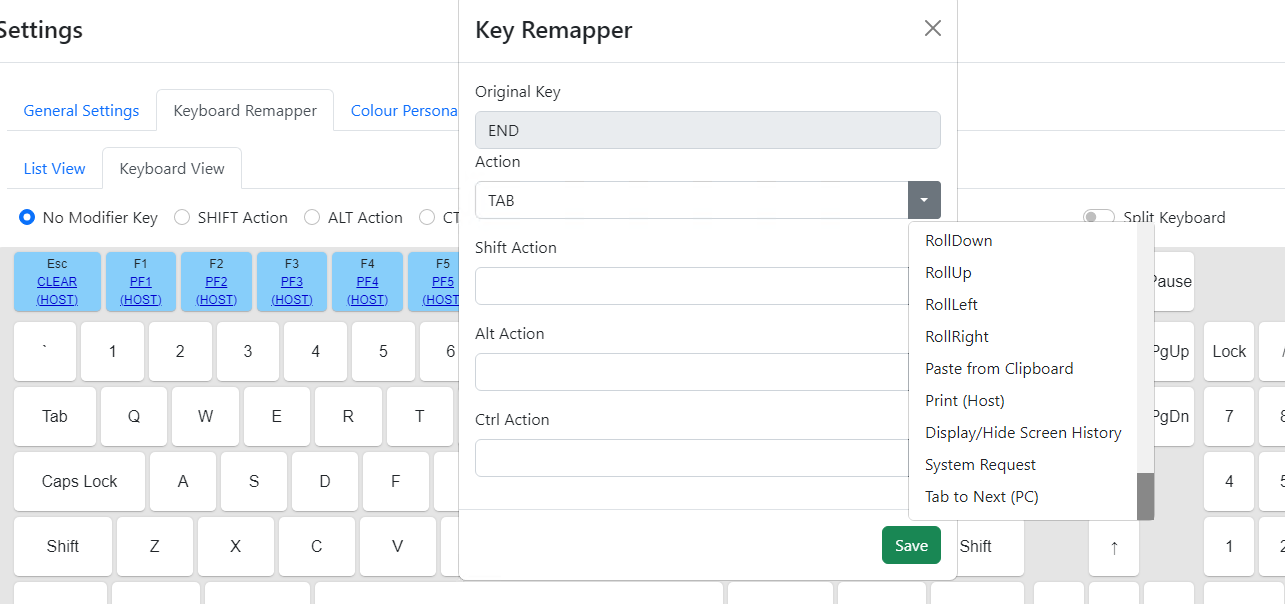
Note: In the standard install there are only AID keys defined in the default key mappings.
The standard default key mappings include the escape key and function keys F1 to F12 with F13 to F24 as the shifted action on F1 to F12:
{
    "OriginalKey": "ESCAPE",
    "OriginalKeyCode": 27,
    "Action": "CLEAR (HOST)",
    "ActionCode": -1
  },
  {
    "OriginalKey": "F1",
    "OriginalKeyCode": 112,
    "Action": "PF1 (HOST)",
    "ActionCode": -1,
    "ShiftAction": "PF13 (HOST)",
    "ShiftActionCode": -1
  },
  {
    "OriginalKey": "F2",
    "OriginalKeyCode": 113,
    "Action": "PF2 (HOST)",
    "ActionCode": -1,
    "ShiftAction": "PF14 (HOST)",
    "ShiftActionCode": -1
  },
Defining new default mappings requires that keys.json has the respective action and that the key event code is correct for the physical key being mapped. ActionCode and ShiftActionCode will always be -1.