Log Cleanup
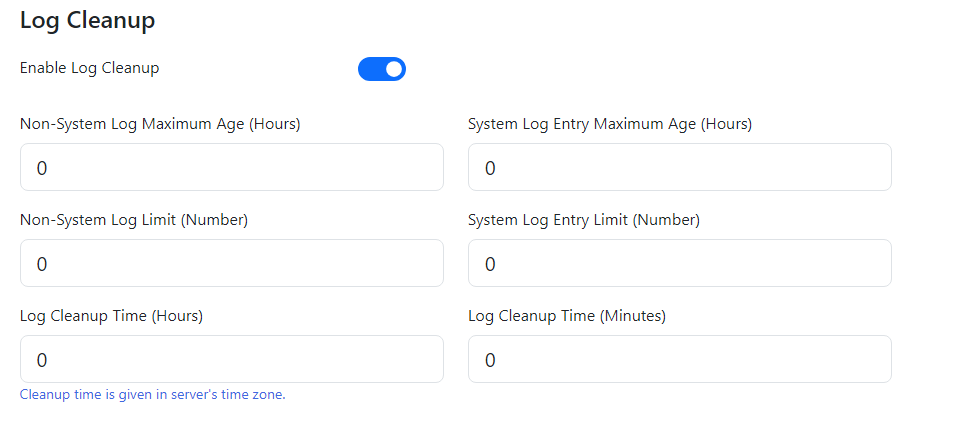
The Log Cleanup settings are found under Logging Server -> Log Level. Log Cleanup allows access to detailed housekeeping of log files and the trimming of logging information down to necessary amounts. Parameters can be manually input by users to customize the logging environment as required.
Note: Non-System Log files contain information on the live terminal emulation session. System Log files contain information on the process level logging of the software.
System files can be identified because of the trailing 000s in the naming.
Turning on and off
If this option is turned off, no log cleanup will be done. To enable the log cleanup the button switch must be clicked. The blue background as shown above in the button means log cleanup is on and now enabled.
Cleanup Parameters
Non-System Log Maximum Age (Hours)
The time period (in hours) input here is used to determine if a non-system log file must be removed from the system. When the log cleanup time is reached, the logging server removes any non-system log files older than this time period.
Non-System Log Limit (Number)
This setting determines the maximum number of non-system log files that can be stored, log files generated past this log limit will be deleted by the log cleanup. The input format for this parameter are whole numbers/integers (e.g. 1000).
System Log Entry Maximum Age (Hours)
The time period (in hours) input here is used to determine if an entry in a system log file must be removed. This time period determines which system file log entries get cleared with the log cleanup tool. If the entry in the system log file exceeds this maximum age time period then it will be picked up by the log cleanup and entry will be cleared.
Note, unlike the Non-system setting- the system logs get cleared of data entries as the name suggests instead of being deleted.
System Log Entry Limit (Number)
This setting determines the maximum number of entries in a system log file that can be stored. When the cleanup time is reached, if the number of entries in the system log file exceeds this number the oldest entries will be deleted until below this number. The input format for this parameter are whole numbers/integers (e.g. 1000).
Log Cleanup Time (Hours)
The time at which the cleanup is processed will be at the input hours (e.g. 11 to represent the 11th hour on a 24 hour clock, 0 to represent midnight).
Log Cleanup Time (Minutes)
The time at which the cleanup is processed will be at the input minutes (e.g. 30 to represent the 30th minute in a hour).
Time Zone Note
The log cleanup uses the server's time zone, it is important to keep this in mind when setting the log cleanup times.
Save
Press the save button at the top right side of the screen to save this setting and log cleanup settings will update, no other changes need to be made for the cleanup settings to be updated.