Active Sessions
Number of Active Sessions
The Active Sessions title states the number of sessions in use.
Refresh Button
Pressing the green Refresh button fetches the latest number, and details for, connected sessions.
Connected Sessions List
If any sessions are connected, they are displayed in a list.
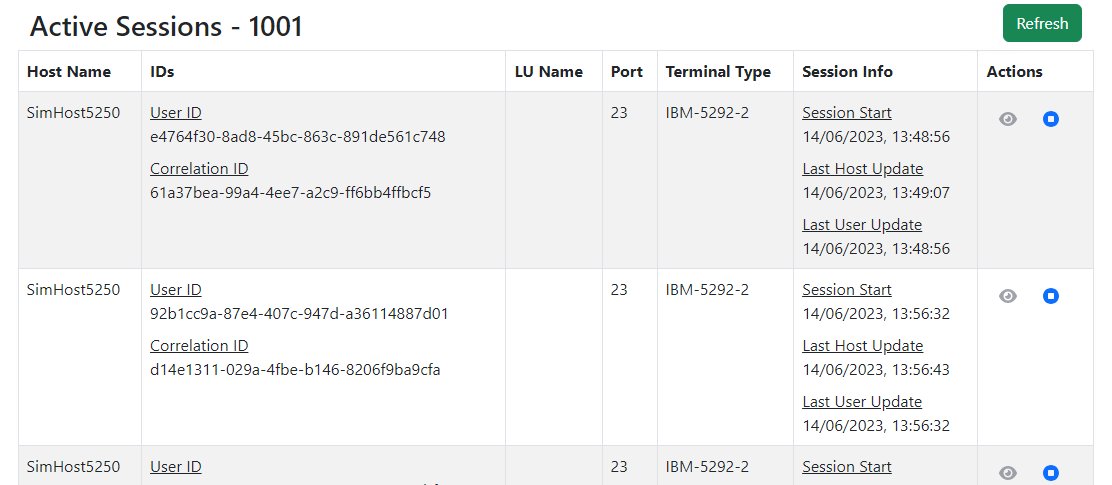
Host Name
The name the user chose to make this host session.
IDs
Normally the User ID and Correlation ID, which are both GUIDs and can be used to identify the user and relevant logs files
LU Name
The mainframe logical user name allocated or chosen for this user's login
Host Port
The Port that the session is connected to.
Terminal Type
The terminal type being used for the connection.
Session Info
Session start and latest host and user's updates (date and time)
Actions
The eye icon is reserved for future use.
The stop icon (blue circle with white square) allows the Manage Console user to drop the connection to the host for that session.